

Bookora guides
How to listen to EPUB and FB2 books on Android
Updated 6 November 2026 · By Bookora
To listen to EPUB on Android or use an FB2 reader with text to speech, import your own book into Bookora and open the large Reader player. Bookora turns the ebook text into speech while keeping the reader on screen. You can follow the highlighted passage, pause, change speed and return to silent reading without looking for a separate audiobook.
Install Bookora on AndroidBefore you start
Install Bookora, import a lawful EPUB or FB2 file, and open the book in the reader. Make sure media volume is audible. Narration uses the text inside the ebook; a scanned image-only document or a file with no usable text cannot provide the same result.
- 01
Import and open a supported book
In the Bookora library, tap + or Add book and select an EPUB or FB2 through Android's file picker. Wait for the title to appear, then open it in the reader.
- 02
Open the reader player
Use the playback control in Reader to open the large player. Bookora has one main reader player, so voice, speed, pause and progress controls stay with the book you are reading.
- 03
Choose the voice and language
Select a voice available for the language of the book. If pronunciation sounds wrong, confirm that the chosen voice language matches the text. Voice availability depends on the current Bookora version and installed voice package.
- 04
Start playback and follow the text
Press play and keep Reader open. Bookora highlights the passage associated with narration. Pause whenever you want to inspect the text or switch back to silent reading.
- 05
Adjust speed and resume later
Choose a comfortable playback speed rather than forcing a fast voice. When you stop, Bookora keeps reading progress so you can reopen the book and continue from a meaningful position.
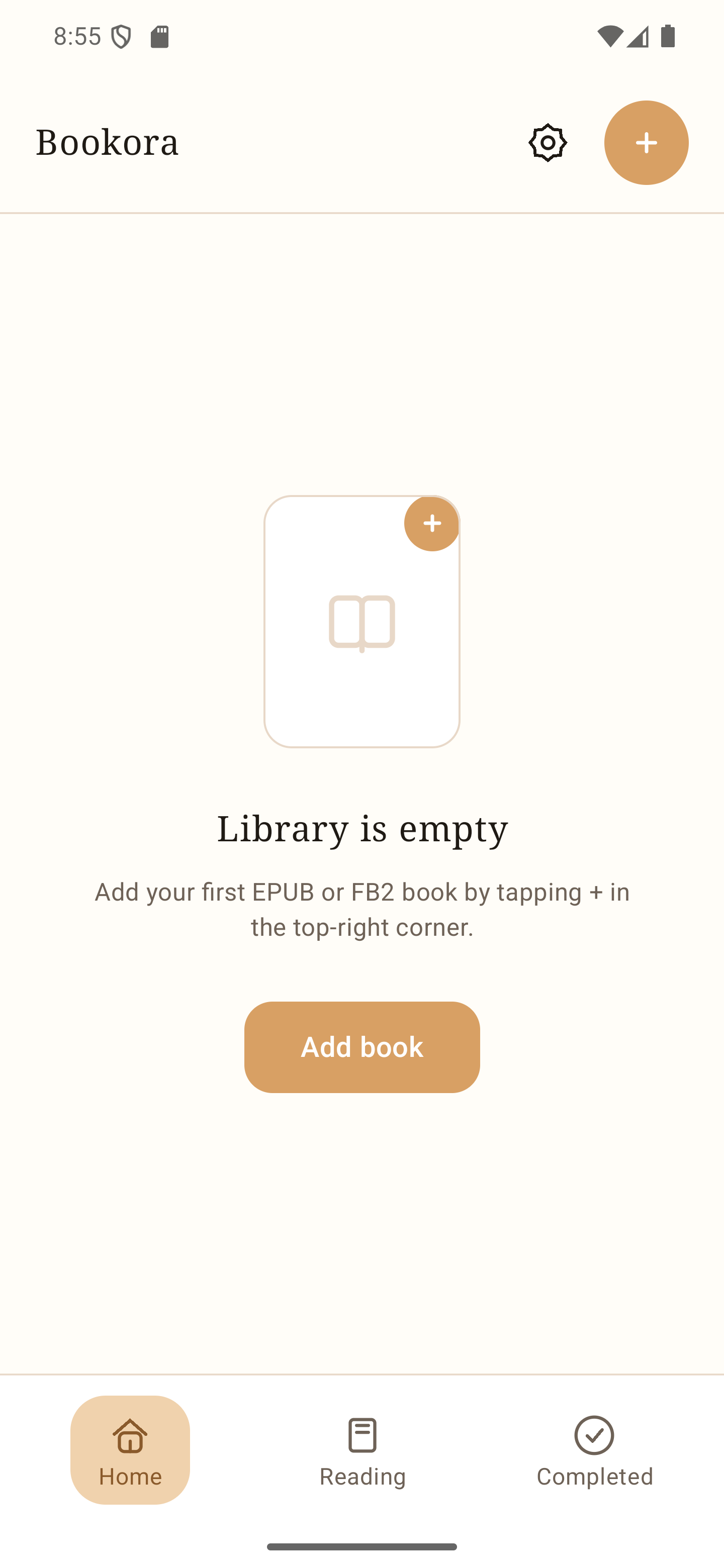
Actual Bookora Android library screen. The + button and Add book open the file picker.
Text to speech is not a recorded audiobook
An audiobook contains audio recorded or produced in advance. Text to speech creates narration from the ebook's written content when you use the feature. That is why the same Bookora player can work with your own EPUB and FB2 files without a separate audio download for each title.
The result depends on the source text. Chapter headings, abbreviations, numbers, language changes and unusual punctuation can affect pronunciation. Bookora cannot restore text that is missing from the file or reliably narrate pages that contain only images.
- EPUB and FB2 remain readable as text while narration is paused.
- A matching voice language improves pronunciation.
- Playback speed changes delivery, not the ebook content.
- Bookora does not supply the books being narrated.
Bookora Voice and privacy
Bookora Voice is designed to generate speech locally on the Android device for supported configurations. The book text and generated audio are not sent to Bookora's server for voice generation. A required voice package may need to be downloaded before local playback is available.
Bookora does not silently replace a failed Bookora Voice session with another provider. If a voice cannot start, check the selected voice and package, then retry or choose another voice explicitly when the app offers one. Some extended voice features may require Premium; the terms are shown before purchase.
Reading position and playback position
The page you can see and the passage being played are related but separate states. You may browse the chapter while audio continues, or pause audio and read elsewhere. This prevents an accidental page movement from being treated as an instruction to skip the narration.
When you want the two positions together again, use the reader and player controls rather than repeatedly tapping play. This gives Bookora a clear command and makes it easier to understand where playback will continue.
Common questions
Is Bookora narration the same as an audiobook?
No. Bookora generates speech from the ebook text; a traditional audiobook is a separate audio recording.
Can I listen while following the words?
Yes. Keep Reader open and follow the highlighted passage. You can pause the voice at any time and continue reading.
Does Bookora upload my book to create the voice?
Bookora Voice generates speech on the Android device for supported configurations. Book text and generated audio are not sent to Bookora's server for speech generation.
Why does the voice use the wrong pronunciation?
The selected voice language may not match the book, or the source may contain abbreviations and mixed languages. Choose a matching voice and test another paragraph.
Why is there no sound even though the book opens?
Check media volume, Bluetooth routing, the selected voice and any required voice package. Opening the book proves import, not audio output.
Can every EPUB and FB2 be narrated perfectly?
No. Damaged markup, missing text, image-only content and unusual language changes can limit the result.
Use your own legally obtained book files. Bookora does not supply books.
Bookora for Android